Draw your way there.
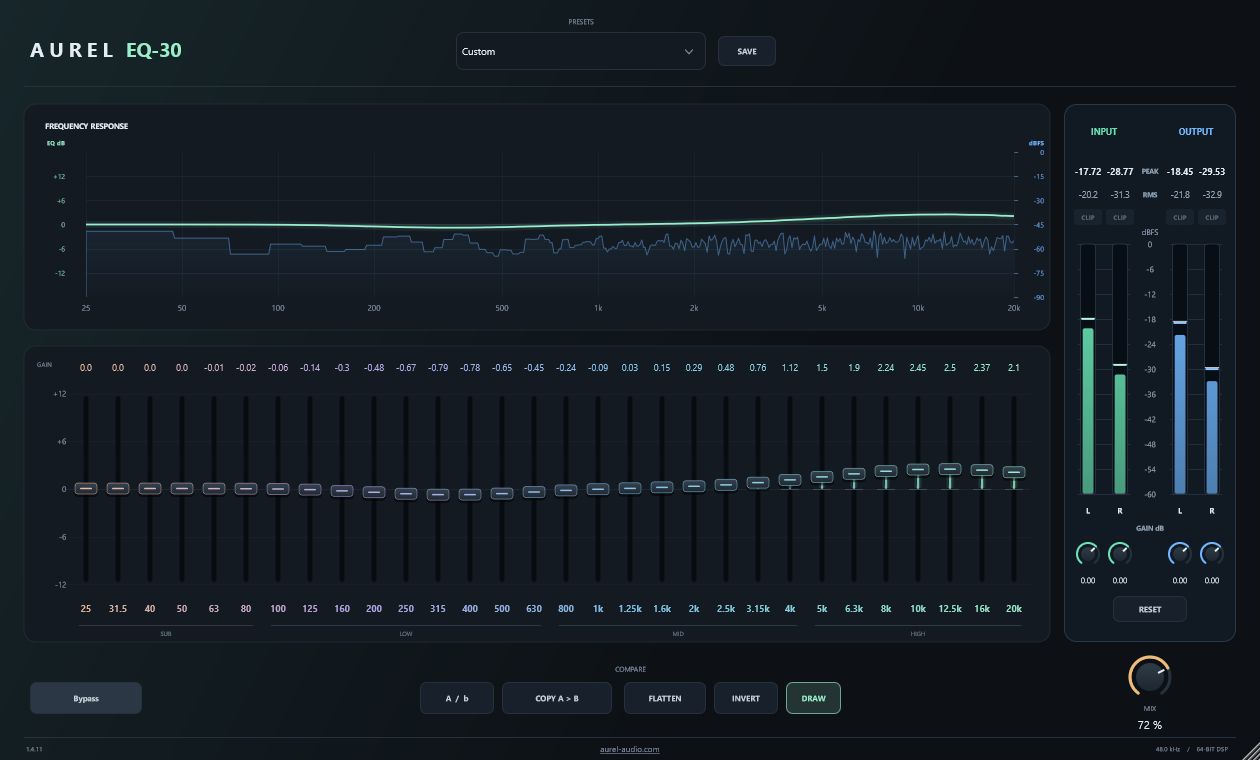
Drag across the bands to sketch a shape in one gesture. Switch Draw off when you want to focus on a single fader.
INTRODUCING AUREL EQ-30
WINDOWS x64 VST3Thirty bands. One clear view. A graphic equalizer
built to keep you in the flow.
MEET YOUR NEXT SESSION
01 / GRAPHIC EQUALIZER
Bring a little air. Settle the low end.
Find the space in between.
See the whole picture as you shape it.
Drag across the bands to sketch a shape in one gesture. Switch Draw off when you want to focus on a single fader.
Move between A and B, copy your settings, or bypass the EQ. Keep a reference while you explore the next idea.
Save your own presets. Resize your workspace. Each instance remembers its Draw setting and window size with your project.
GET INTO THE DETAILS
EXPLORE THE INTERFACE
A frequency response display and 30 individual faders keep the shape of your EQ in one view. Draw across the bands or enter a value directly.
THE ACTUAL PLUGIN INTERFACE ↗INDEPENDENT BY DESIGN
We believe a good tool makes room for your ideas. Clear controls. Useful feedback. The freedom to follow your ears.
EQ-30 is our first step. A focused tool, made for the work of making music.
Meet the first Aurel pluginTHE AUREL COLLECTION
ONE PLUGIN. PLENTY OF POSSIBILITY.
A clear view. A hands-on workflow.
Find the shape of your next idea.
Check your setup in the compatibility guide below.
The current release is a Windows x64 VST3 plugin. You’ll need a 64-bit Windows DAW that supports VST3. macOS, AU and AAX versions are not currently available.
Close your DAW, then copy the complete Aurel EQ-30.vst3 bundle into C:\Program Files\Common Files\VST3. Reopen your DAW and rescan its plugins if needed. Keep the bundle’s internal folders together.
Yes. EQ settings, Draw mode and window size are saved with each plugin instance in your DAW project. Save the project before closing your session.
Purchase and activation details are being finalized. They’ll be published here before sales open. The current 1.4.11 release is supplied under AGPL-3.0-or-later with corresponding source and dependency notices.
Retail availability has not been announced. Confirmed stores will be listed here when available.
YOUR NEXT GOOD IDEA STARTS HERE.
Make it yours.